I Said The Server Would Stay Closed. Today All Of It Is Open Source
If you're new here: OneCamp is a self-hosted workspace: chat, docs, tasks, boards, calls, a calendar, and AI teammates you can govern, on your server. It comes in two editions, one with AI and one with no AI at all.
For a long time the honest description was "self-hosted, with an open-source web app and a licensed backend". The web app's README even promised that the AI-free server would one day be released under Apache-2.0, and that the AI edition would stay commercial.
I changed my mind about the second half. As of today, all of OneCamp is open source:
- The server is at github.com/OneMana-Soft/OneCamp under AGPL-3.0.
mainis the edition with AI teammates,without-aiis the one with none. - The web app, OneCamp-fe, stays MIT.
- A new desktop app is MIT too.
Why AGPL, and why both editions
I looked hard at the "source available" licences that keep you from competing with the author. They protect a business, but they also mean you cannot call the thing open source, and every serious self-hosted workspace I compete with is genuinely open. Being the one closed option in that list costs more than it protects.
AGPL-3.0 is real open source. You can use, read and change OneCamp for any purpose, inside a company of any size, for free. The one condition: if you change it and let people outside your organisation use your changed version over a network, you offer them your changes. That condition is what stops anyone from taking OneCamp, closing it, and selling it back as a hosted service.
And the AI edition is open because the AI edition is where the trust question lives. "An agent can only reach what the person who sponsors it can reach, and every action it takes is signed" is a claim you should be able to check by reading the code that enforces it, not by taking my word for it.
If your company cannot accept AGPL, there is a commercial licence. It is the same thing as the lifetime licence: pay once, and your company has no AGPL obligations.
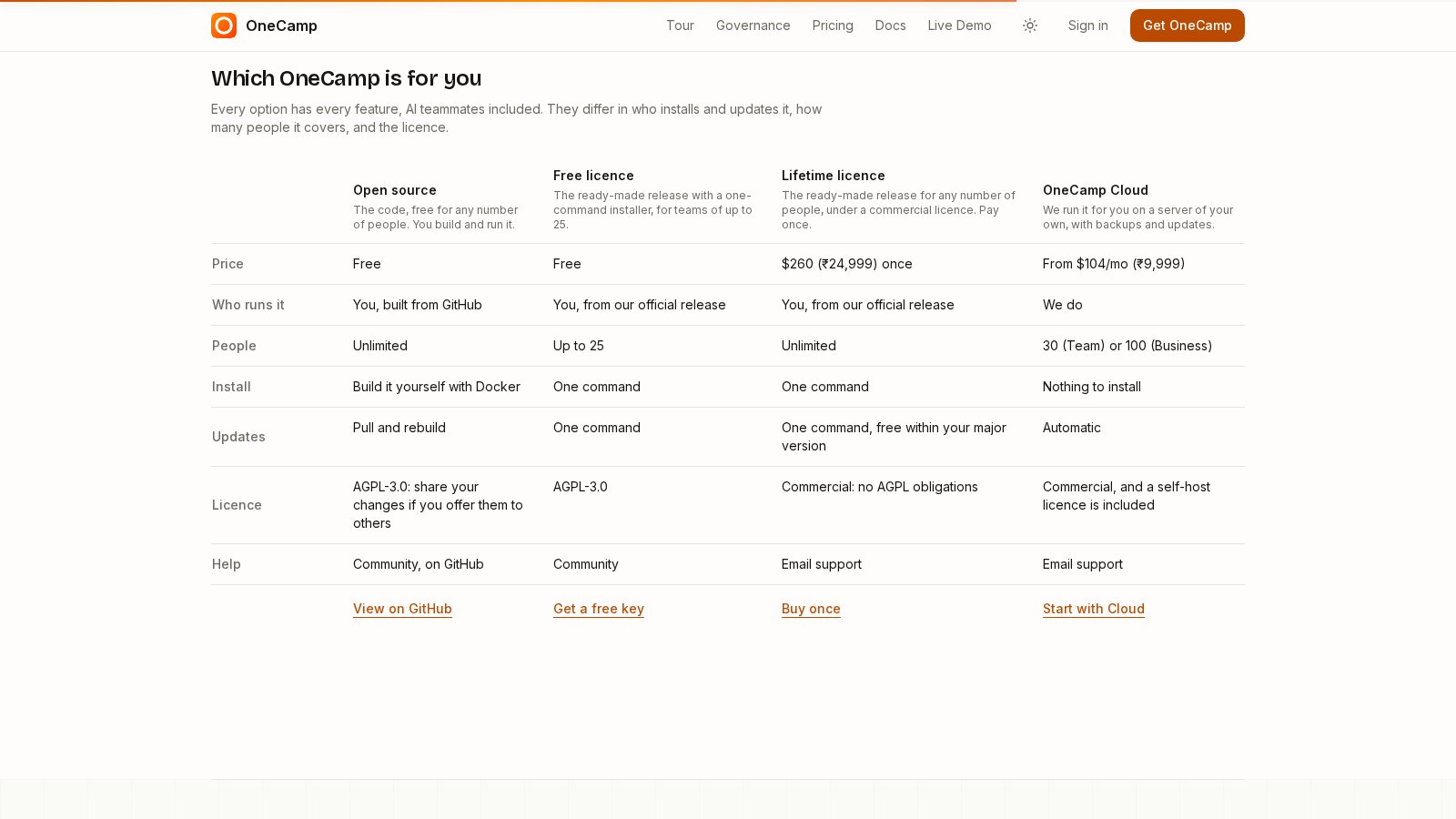
Which OneCamp is for you
Every option has every feature, AI teammates included. They differ in who installs and updates it, how many people it covers, and the licence:
| Open source | Free licence | Lifetime licence | OneCamp Cloud | |
|---|---|---|---|---|
| Who runs it | You, built from GitHub | You, from our release | You, from our release | We do |
| People | Unlimited | Up to 25 | Unlimited | Set by plan |
| Install | Build it yourself | One command | One command | Nothing |
| Updates | Pull and rebuild | One command | One command | Automatic |
| Licence | AGPL-3.0 | AGPL-3.0 | Commercial | Commercial |
| Help | Community | Community |
In one line each:
- Open source is for people who like building things: clone it, build it, run it for as many people as you want.
- The free licence is the same product as a ready-made release with a one-command installer, for teams of up to 25. Get a key, no card. Agents, bots and guests don't count toward the 25.
- The lifetime licence is the ready-made release for any number of people, with the commercial licence. Buying it lifts the limit on the server you already run: re-run the same install command afterwards.
- OneCamp Cloud is for teams that want none of the above. We run it for you on a server of your own, with backups and updates.
Current prices are on the buy page.
One server, one command, really
Until this week, "install OneCamp" meant two deployments: the server on your machine, and the web app somewhere else (Vercel, usually), with its own domain and DNS records. People who expected one command met a second job right at the moment they thought they were done.
The installer now builds and serves the web app from the same server. One make install, one set of DNS records, done. Everything needs a Linux server with Docker, 8 GB of RAM and 40 GB of disk, and the installation guide says that before you start, not after.
Knowing there is an update
A self-hosted OneCamp never contacts us on its own, and I want to keep it that way. The side effect was that people ran old versions without knowing anything newer existed, including versions with bugs I had already fixed.
There is now a Check for updates button under Admin, Health and updates. It asks onemana.dev which release is current only when you click it, sends nothing about your workspace, and tells you the one command to run if you are behind. On OneCamp Cloud we update you, so it just says so.
OneCamp on your desktop
The new desktop app is for Windows, macOS and Linux. On first launch it asks for your workspace's address (or offers the live demo), and from then on it opens straight into it:
- Native notifications, and a tray icon that keeps it running when you close the window, so messages still reach you.
- Links in messages open in your normal browser, and signing in with Google or SSO works inside the app.
- It updates itself, and refuses an update whose signature doesn't match.
It holds no copy of OneCamp. It opens your own workspace, so it always matches the version your server runs. The installers aren't code-signed yet, so Windows and macOS will warn you the first time; the download page says how to get past that.
What I found the day I opened the code
Publishing code changes how you read it. While preparing the release, a search for anything that looked like a credential turned up this line in the collaboration service:
process.env.INTERNAL_SECRET || 'super-secret-key'
INTERNAL_SECRET is what OneCamp's own services use to talk to each other, for things like loading a document for live editing. If it was never set, the service quietly fell back to a value that is now printed in public. The installer has always generated a random value for it, so installs made with make install were fine, but our own demo was not: it had been running on the fallback. I rotated it.
Then I made it impossible to repeat. In v2.38.1 (and v1.24.1), the fallback is gone, and the server refuses its internal routes outright if the secret is a known default or shorter than 16 characters, with a log line saying what to set. If you run an older install that you set up by hand, update and check that log.
What else shipped this week
The next two posts cover the rest:
- Half the team was still in Slack, and everyone's email was in another tab: a live bridge so a team can move off Slack gradually, and your Gmail inside OneCamp.
- My agents kept saying done when they had only started: agents that finish what they start, tell you things privately, and sign their work.
If you try OneCamp, from source or from the free plan, I would like to hear what got in your way. Issues and discussions are open at github.com/OneMana-Soft/OneCamp.
Get the next one
I write these as I build OneCamp: what broke, what it cost, and what I changed.