Formulas, Sorting And Filters For Your Tables
If you're new here: OneCamp is a self-hosted workspace (chat, tasks, docs, calls, calendar and AI agents) that you install on your own server. It is open source and free for up to 25 people.
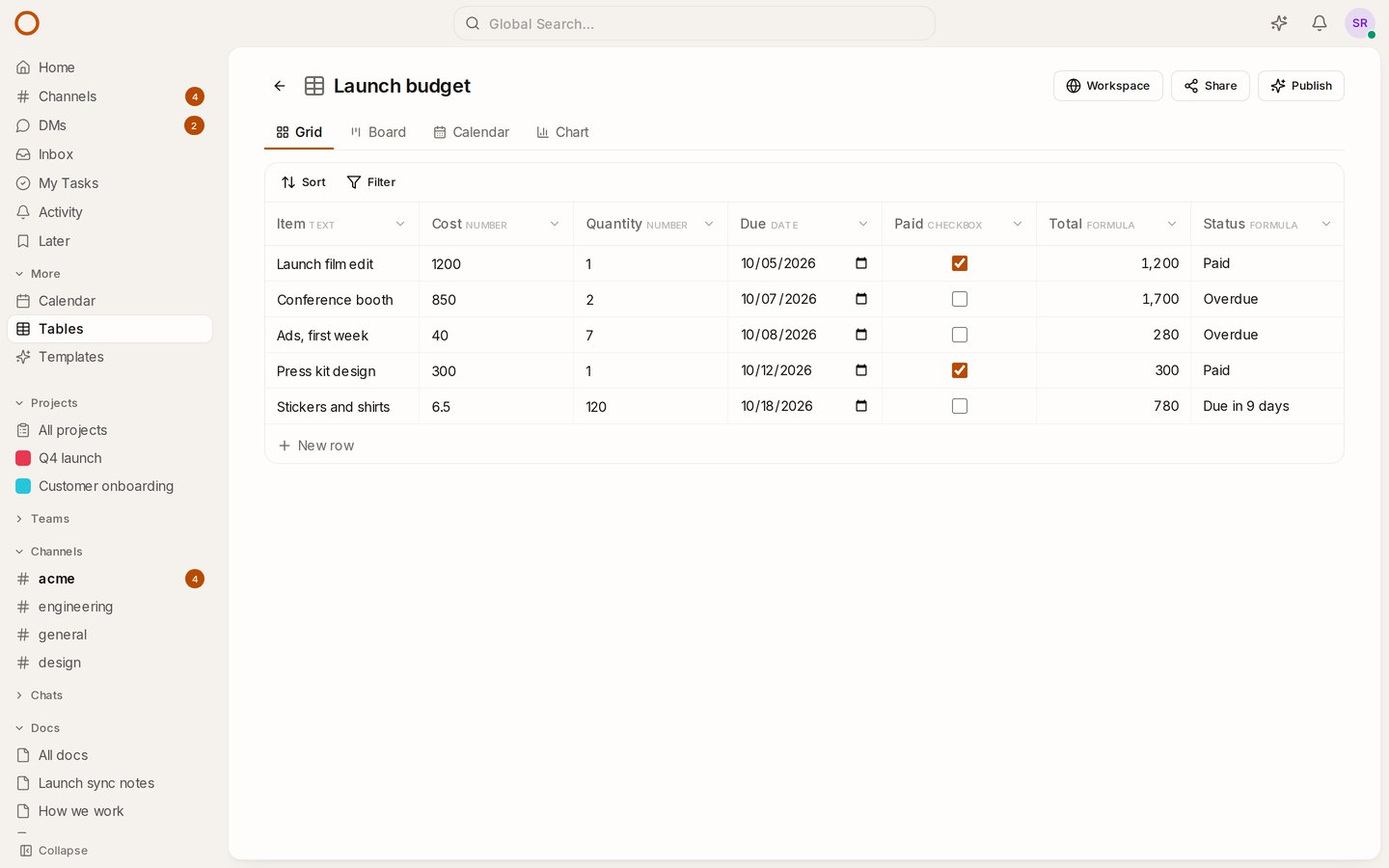
A table of costs wants a Total column. A list of deliverables wants a column that says which ones are late. Until now you worked those out by hand, or in a spreadsheet beside OneCamp. Now a column can work them out itself.
Add a formula column
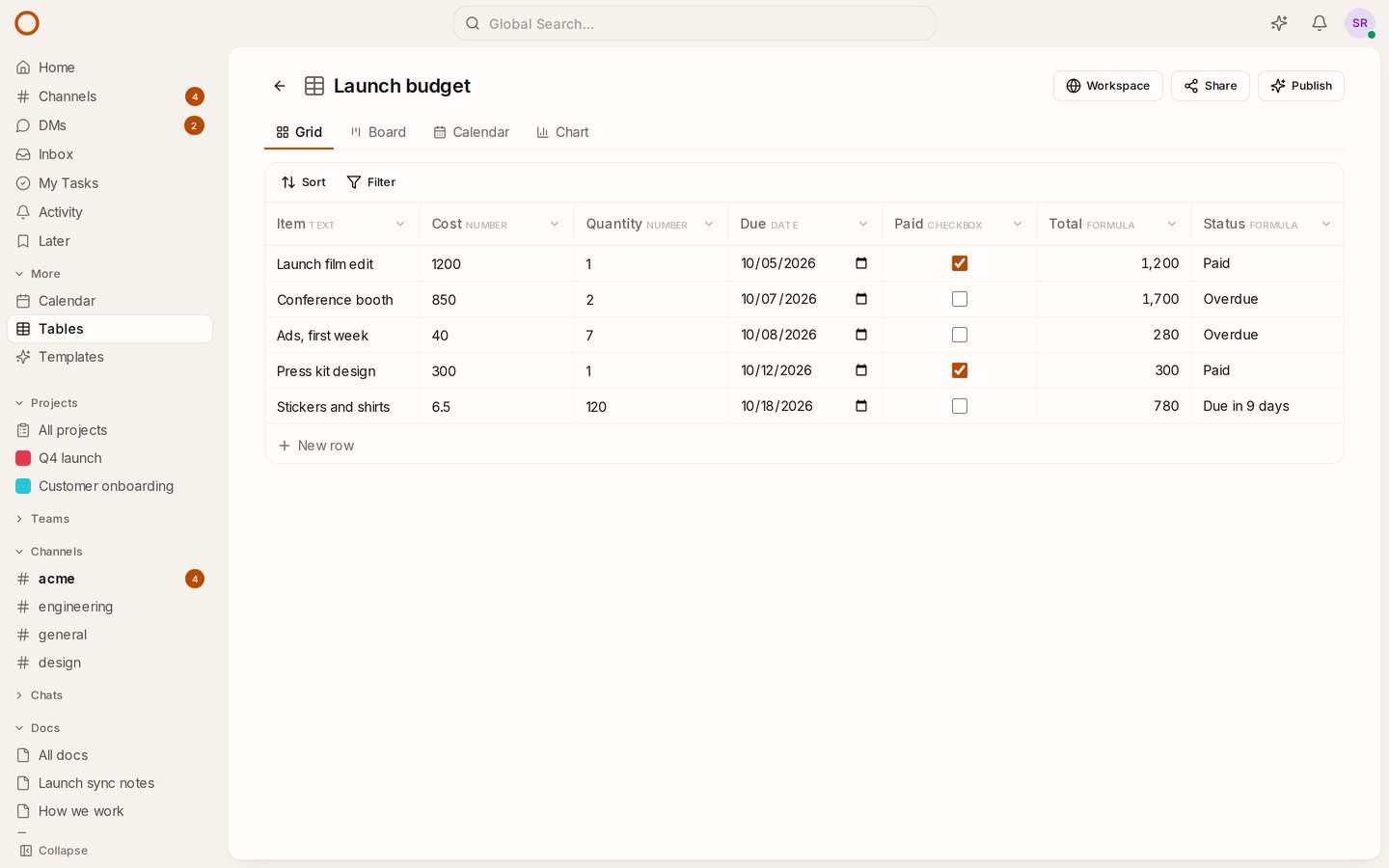
Press + at the end of a table's columns, name the column and choose Formula. Then write it, with each field's name in braces:
{Cost} * {Quantity}
As you type, the line under the box says what the formula gives on your first rows ("Gives a number: 1,200, 1,700, 280"), or what's wrong and where. The table's fields are listed under the box: press one to put it in where the cursor is. Show functions lists everything you can use, with how each is written.
A few that earn their keep
| What it shows | Formula |
|---|---|
| With 18% tax | ROUND({Total} * 1.18, 2) |
| Overdue work | IF(AND(NOT({Done}), {Due} < TODAY()), "Overdue", "") |
| Days left | DATETIME_DIFF({Due}, TODAY()) |
| Working days in a stretch | WORKDAY_DIFF({Start}, {Due}) |
| A label by priority | SWITCH({Priority}, "High", "Urgent", "Low", "Later", "Normal") |
There are 44 functions for logic, numbers, text and dates, named and written as they are in Airtable, so they'll look familiar. (One difference: DATETIME_DIFF counts days unless you say otherwise, where Airtable counts seconds.) A formula can use another formula's value too: a Total, then a Total with tax.
Things that just work
- Renaming a field doesn't break anything. Formulas keep track of the fields they use, not their names. Delete a field a formula needs and the formula says so, in its column header and in every row, until you fix it.
- Today is your today.
TODAY()uses the time zone you're in: in India a deadline turns overdue at midnight, not at 5:30 the next morning, when a server on UTC would get there. - Everyone sees the same values. Formulas are worked out on your server each time the table opens, not in each browser: board cards, a table embedded in a doc, a guest link and the chart all read the same numbers, and the chart can add up a formula that gives one.
Sort and filter, at last
Above the grid, board and calendar there's now a Sort and a Filter. Sort by up to three fields, in the order that fits each (A → Z, 1 → 9, oldest first); empty cells go last. Filter to the rows you want: Cost over 500, Stage is Live, Due before Friday, Paid not ticked, with every filter or any one of them. A formula sorts and filters by what it gives, so "Status is Overdue" or "Total over 1,000" just work.
"Showing 3 of 12 rows" tells you when a filter hides some. Your sorts and filters are yours: they don't change the table for anyone else.
How it compares
monday.com keeps its formula column for the Pro plan and up, and ClickUp's free plan stops at 60 uses of custom fields, formulas included. In OneCamp they're in every edition, the free one included, with no cap, and the data never leaves your server.
Try it
- Open the live demo and open the Launch budget table: Total and Status are formulas. Open Status's menu to see how it's written.
- On your own server: onemana.dev/free gives you the install command, no email needed.
- Already running OneCamp? Update to v2.68.0 (with AI) or v1.53.0 (without AI).
Get the next one
I write these as I build OneCamp: what broke, what it cost, and what I changed.